Intelligence surfaces findings
Review unusual activity, inspect its evidence and record whether it is expected, useful or worth investigating. You decide what needs a response.
INTYGA Intelligence
Investigate unusual authorization activity with the evidence in front of you. Intelligence is an open-source, self-hosted application that surfaces findings and protects sensitive configuration changes with signed human approval.
Requires an INTYGA workspace. Production hardening is underway. See setup requirements →
From activity to a reason to investigate
A release service starts attempting permission changes. Its requests are refused, but the pattern deserves a closer look. Intelligence compares that activity with the same subject's observed history and surfaces the difference.
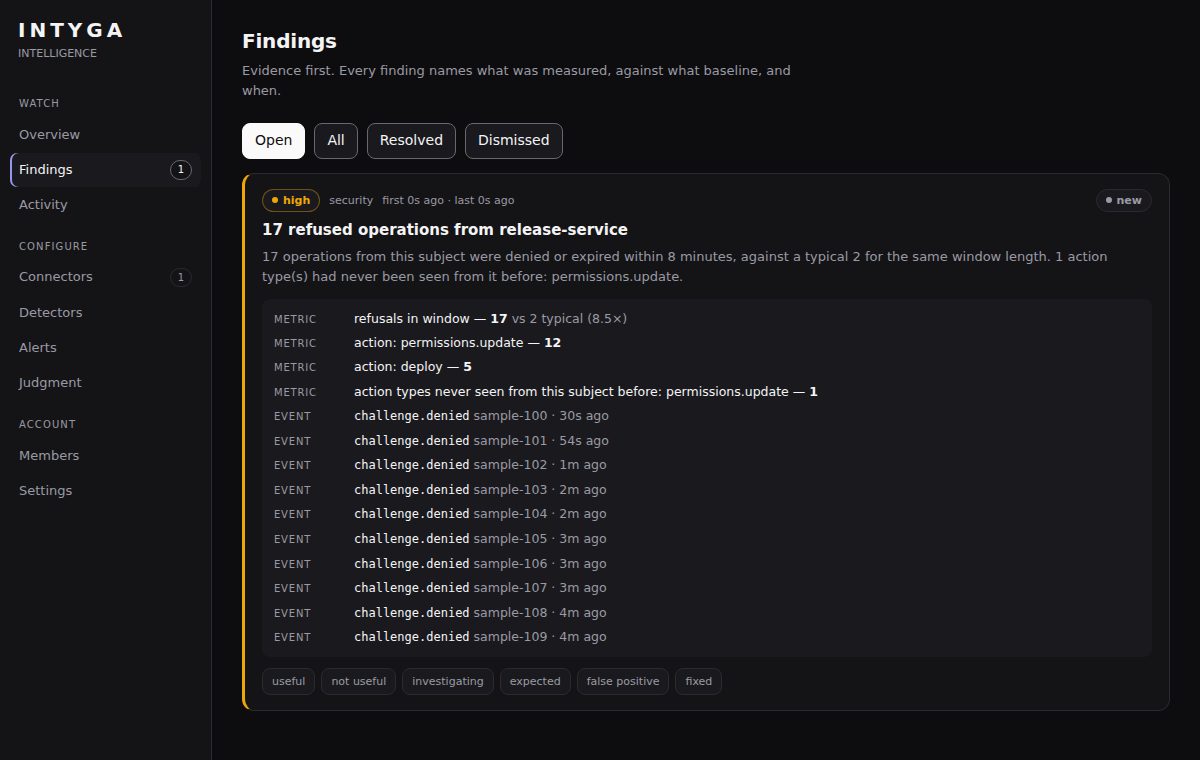
The volume changed. Seventeen refusals exceed both the detector's minimum count and its threshold relative to this subject's baseline of two per window.
The behavior changed. Twelve attempts involve permissions.update, an action type absent from this subject's earlier observed refusal history.
The evidence is inspectable. The finding includes counts, the baseline and references to source events. No model is needed to produce this finding. It is a reason to investigate, not proof of a compromise.
How it fits with INTYGA
Review unusual activity, inspect its evidence and record whether it is expected, useful or worth investigating. You decide what needs a response.
Enabling connectors, turning on alert destinations, switching a detector off, issuing an administrator's enrollment link, configuring model judgment and purging data each require a passkey approval bound to the exact change, so a detector cannot be silenced from the console without one. Intelligence uses INTYGA's embedded approvals to enforce it.
Intelligence observes connected activity; it does not automatically remediate your systems. Its availability does not affect INTYGA's authorization service. If INTYGA is unreachable, privileged changes inside Intelligence cannot proceed without approval.
Connectors bring operational events into a common format. Connecting a source determines what Intelligence can observe. For anything not listed, send signed events to the custom webhook without writing code, or write a connector in a single file.
Three detectors: refusal bursts and unfamiliar action types, security-sensitive code changes, and regressions after a production deploy. Each finding starts with measured evidence. A post-deploy finding reports timing, not proof of cause, and says so.
Model judgment is off by default. If enabled, it can adjust severity or filter expected behavior after detection. It does not originate findings.
Run Intelligence and its database on your infrastructure. Approval requests send INTYGA a digest of the change. Optional model and alert integrations send their configured data to those destinations.
Current scope: three detectors — refusal bursts, security-sensitive code changes, and regressions after a production deploy. Connectors are reference implementations built on each vendor's documented API.
Open source · Self-hosted
Intelligence is licensed under Apache 2.0. The early release is available to inspect and evaluate while production hardening continues; it has no support SLA.
The application's open-source license is separate from your INTYGA workspace plan. See workspace plans →